Skip to content
Netflix · Video calls free

Watch Netflix together,and actually see each other.

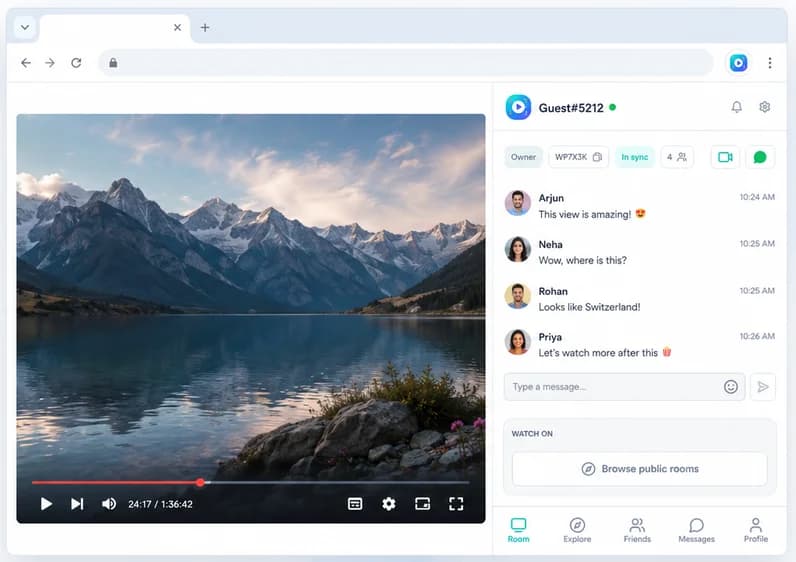
Everyone opens the same show on their own Netflix account. Press play once and it plays for everyone, with a free group video call right beside the episode.

Add to Chrome, it's free
  • Free
  • No account needed
  • Desktop Chrome
Watch Party side panel open next to a video, with the room chat and in-sync status

Works on

  • YYouTube
  • NNetflix
  • TTwitch
  • PPrime Video
  • DDisney+
  • HHulu
  • + any site with a video

How to start

  1. 1

    Everyone adds the extension

    Each person adds Watch Party to desktop Chrome. Free, no account needed.

  2. 2

    Open the same title

    The host opens the movie or episode on Netflix.

  3. 3

    Create the party

    Click the Watch Party icon, press Create Watch Party and share the room code.

  4. 4

    Call and press play

    Start the video call in the side panel, press play, and watch in sync.

What you get

Free video call beside the show

See and hear each other next to the episode, without a second app.

Pause for everyone

Snack break? Pause once and the whole room pauses. Skip the intro together.

Chat and reactions

Comment without talking over the dialogue, react to the cliffhanger.

Full Netflix quality

Everyone streams from their own account, so nobody watches a blurry copy.

What you need

  • Desktop Chrome for each person
  • Your own Netflix account each. Nobody's account is shared and the video is never re-streamed.
  • The same title in each region if you're in different countries

Why screen sharing Netflix shows a black screen

Netflix protects its video, so when you share your screen in Discord, Zoom or Meet, your friends usually see a black box with sound. Even when it does show, a screen share is compressed and choppy. A watch party works differently: everyone streams Netflix themselves, at the quality their plan allows, and only the play, pause and timestamp are kept in step. More in watch party vs screen sharing.

Using Teleparty?

Teleparty is the best-known Netflix watch party extension. Its free plan includes sync and text chat; voice and video chat are part of its Premium plan. If seeing each other matters, Watch Party includes the video call for free. Compare all the options in Teleparty alternatives.

Make it a proper Netflix night

Netflix, Teleparty, Discord, FaceTime are trademarks of their owners. Watch Party is independent and isn't affiliated with or endorsed by them.

Frequently asked questions

Can you video call and watch Netflix at the same time?

Yes. With Watch Party the video call runs in the side panel next to Netflix, and playback stays in sync for everyone. Watching while on FaceTime or another call app also works, but you'll have to count down to press play and you'll drift out of sync when someone pauses.

Does Netflix have its own watch party feature?

No, Netflix doesn't have a built-in watch party. "Netflix Party" was the original name of the Teleparty extension. Today you use a browser extension to watch together.

Does everyone need their own Netflix account?

Yes. Each person plays the show from their own account. Watch Party only keeps playback in step and never shares or streams the video.

Why do my friends see a black screen when I share Netflix?

Netflix protects its video, so screen sharing in Discord, Zoom or similar apps usually shows a black screen. Syncing playback avoids the problem: nobody shares their screen, everyone streams Netflix themselves.

Is a Netflix watch party allowed?

A sync extension doesn't copy, record or re-stream Netflix. Everyone watches on their own account and only the play state is shared. Netflix's terms still apply to each account.

Can I watch Netflix together with someone in another country?

Yes, as long as the title is available in both of your Netflix regions. Everyone streams locally, so distance doesn't affect quality.

Does it work on the Netflix app, phones or TVs?

No. Watch Party is a Chrome extension, so everyone watches Netflix in desktop Chrome.

Press play once. Everyone watches together.

Synced playback, live chat and video calls, free in Chrome.

Add to Chrome, it's free