Skip to content
Chrome Web Store · Free

Download the watch party extensionfor Chrome. Free.

Add Watch Party: Sync Video, Chat & Call once and start or join a watch party on any site with a video. No account needed, with synced playback, chat and group video calls.

Add to Chrome, it's free
  • Free
  • No account needed
  • Desktop Chrome
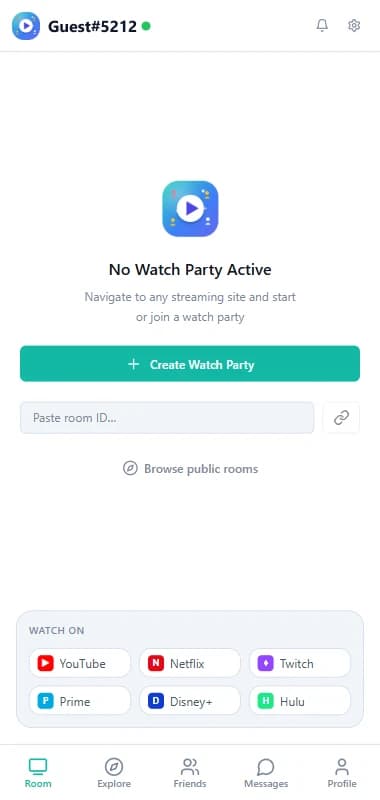
Room tab with the Create Watch Party button, room ID field and supported sites

Works on

  • YYouTube
  • NNetflix
  • TTwitch
  • PPrime Video
  • DDisney+
  • HHulu
  • + any site with a video

How to start

  1. 1

    Open the store page

    Click Add to Chrome above. It opens the official Chrome Web Store listing.

  2. 2

    Add to Chrome

    Click Add to Chrome, check the permissions Chrome shows, then Add extension.

  3. 3

    Pin the icon

    Click the puzzle icon in the toolbar and pin Watch Party so it's one click away.

  4. 4

    Start a party

    Open a video, click the icon and press Create Watch Party.

What you get

Synced playback

Play, pause and seek together, on any site with a standard video player.

Video and voice calls

See and hear each other next to the video, free.

Chat and reactions

Talk over the video without switching apps.

Rooms

Invite-only rooms, or public rooms that others can find in Explore.

Friends and messages

Add friends and invite them straight into a room.

Free, no account

No paid plan. Guests join with a room code.

What you need

  • Desktop Chrome
  • Access to the video for each person: on subscription services, everyone uses their own account
  • Friends with the extension too: they install it the same way, then join with your room code

After you install

  1. Open the video you want to watch, on any site with a standard video player.
  2. Click the Watch Party icon. The side panel opens on the right.
  3. Press Create Watch Party and send the room code to your friends.
  4. Press play. Everyone stays in sync. Start the video call from the panel to see each other.

The full walkthrough shows every step for hosts and guests.

Privacy, in short

Watch Party syncs a timestamp and a play or pause state, never your video. Calls go directly between participants, and you can use it as a guest without any personal information. Read the privacy policy.

Install not working?

  • Make sure you're in desktop Chrome, not another browser or the mobile app
  • If your Chrome is managed by work or school, an administrator may block extensions
  • After installing, refresh any video page that was already open
  • Still stuck? Email watchpartyapplive@gmail.com

Frequently asked questions

Is the watch party extension safe to install?

It's distributed through the official Chrome Web Store, and Chrome shows its permissions before you install. It never captures, records or re-streams the video you watch. Details are in the privacy policy.

Why does it need access to the sites I visit?

To keep a video in sync, the extension has to work with the video player on the page you're watching. It doesn't read your browsing history, and nothing is synced on pages where you haven't started or joined a watch party.

Does it work on Firefox, Safari, Edge or phones?

Not right now. It's a Chrome extension for desktop Chrome.

Do my friends need to install it too?

Yes. Everyone in the party adds the free extension so their own video can stay in sync.

How do I update it?

Chrome updates extensions automatically. If something looks outdated, restart Chrome.

How do I uninstall it?

Right-click the icon in your Chrome toolbar and choose Remove from Chrome. Uninstalling stops all data collection.

Press play once. Everyone watches together.

Synced playback, live chat and video calls, free in Chrome.

Add to Chrome, it's free